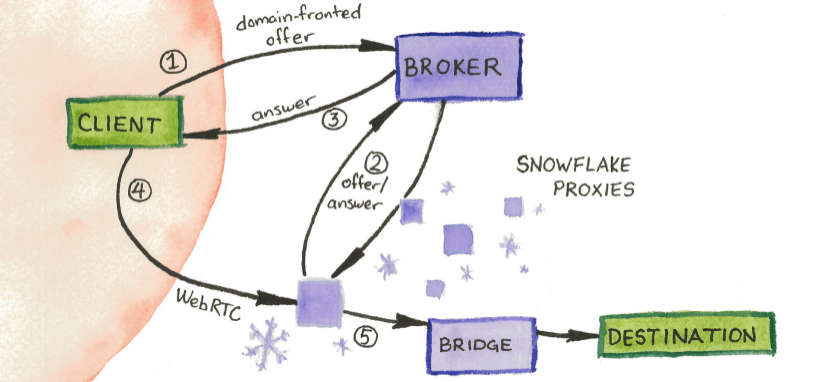
Snowflake è un sistema che permette a utenti di circumnavigare la censura nel web aiutandoli ad accedere alla rete Tor tramite una rete di volontari che mettendo a disposizione la propria connessione comportanosi da intermediari.
Funziona mettendo in comunicazione il volontario e la persona che ne ha bisogno creando una connessione di ingresso alla rete Tor camuffandola come una semplice chiamata vocale o video tramite il protocollo WebRTC.
Per aiutare il volontario ha bisogno soltanto di installare un estensione sul proprio browser Firefox o Chrome e attivarla mentre si naviga normalmente.
Oppure basta attivare snowflake nel box sotto e lasciare aperta questa pagina web
La connessione tra l’utente e il nodo Snowflake è crittografata, il che rende difficile per chiunque esterno identificare l’utilizzo del proxy o intercettare i dati trasmessi.
Inoltre, i volontari che mettono a disposizione la propria connessione non possono vedere il contenuto del traffico Tor degli utenti, poiché la comunicazione è cifrata e anonimizzata. Questo assicura che i volontari restino anonimi e protetti da eventuali responsabilità legali o tecniche relative all’uso della rete Tor da parte degli utenti.
Le mie statistiche
Ad oggi (2024-09-08) queste sono le statistiche nel mio proxy snowflake attivo 24/7
[All time ] Served 17305 People with ↑ 600.4478 GB, ↓ 51.4695 GB
[Last 24h ] Served   142 People with ↑    1.909 GB, ↓  0.1895 GB
[Last Week] Served   929 People with ↑  37.1811 GB, ↓   2.778 GB
Self hosting di un proxy Snowflake
Nella modalità avanzata è anche possibile eseguire snowflake standalone nella propria infrastuttura e per farlo è possibile utilizzare Docker.
Nella documentazione di parla di aprire varie porte per agevolare la comunicazione, questo non è strettamente necessario e snowflake funzionerà comunque tramite il NAT Traversal.
Con lo script sotto è possibile analizzare le connessioni al proprio proxy
# This Script uses the following dependancies
# pip install nums-from-string
# pip install datetime
#
# To Run this script type:
# python analyze_snowflake_logs.py <Log File Name>
#
# The default <Log File Name> is ./docker_snowflake.log
#
# Example:
# python analyze_snowflake_logs.py snow.log
#
# Written By Allstreamer_
# Licenced Under MIT
#
# Enhanced by MariusHerget

import nums_from_string
import sys
from datetime import datetime, timedelta

# Format of your timestamps in the beginning of the log
# e.g. "2022/01/01 16:50:30 <LOG ENTRY>" => "%Y/%m/%d %H:%M:%S"
timestamp_format = "%Y/%m/%d %H:%M:%S"

# Log file path from arguments (default: ./docker_snowflake.log)
logfile_path = sys.argv[1] if len(sys.argv) > 1 else "./docker_snowflake.log"

# Read in log file as lines
lines_all = []
with open(logfile_path, "r") as file:
    lines_all = file.readlines()

# Catch phrase for lines who do not start with a timestamp
def catchTimestampException(rowSubString, timestampFormat):
        try:
            return datetime.strptime(rowSubString, timestampFormat)
        except Exception as e:
            #print(e)
            return datetime.strptime("1970/01/01 00:00:00", "%Y/%m/%d %H:%M:%S")


# Filter the log lines based on a time delta in hours
def filterLinesBasedOnTimeDelta(log_lines, hours):
    now = datetime.now()
    length_timestamp_format = len(datetime.strftime(now, timestamp_format))
    return filter(lambda row: now-timedelta(hours=hours) <= catchTimestampException(row[0:length_timestamp_format], timestamp_format) <= now, log_lines)


# Convert traffic information (in B, KB, MB, or GB) to B (Bytes) and add up to a sum
def get_byte_count(log_lines):
   byte_count = 0
   for row in log_lines:
      symbols = row.split(" ")

      if symbols[2] == "B":
         byte_count += int(symbols[1])
      elif symbols[2] == "KB":
         byte_count += int(symbols[1]) * 1024
      elif symbols[2] == "MB":
         byte_count += int(symbols[1]) * 1024 * 1024
      elif symbols[2] == "GB":
         byte_count += int(symbols[1]) * 1024 * 1024 * 1024
   return byte_count

# Filter important lines from the log
# Extract number of connections, uploaded traffic in GB and download traffic in GB
def getDataFromLines(lines):
   # Filter out important lines (Traffic information)
   lines = [row.strip() for row in lines]
   lines = filter(lambda row: "In the" in row, lines)
   lines = [row.split(",", 1)[1] for row in lines]

   # Filter out all traffic log lines who did not had any connection
   lines = list(filter(lambda row: not nums_from_string.get_nums(row)[0] == 0, lines))

   # Extract number of connections as a sum
   connections = sum([nums_from_string.get_nums(row)[0] for row in lines])

   # Extract upload and download data
   lines = [row.split("Relayed")[1] for row in lines]
   upload = [row.split(",")[0].strip() for row in lines]
   download = [row.split(",")[1].strip()[:-1] for row in lines]

   # Convert upload/download data to GB
   upload_gb = get_byte_count(upload) / 1024 / 1024 / 1024
   download_gb = get_byte_count(download) / 1024 / 1024 / 1024

   # Return information as a dictionary for better structure
   return {'connections': connections, 'upload_gb': upload_gb, 'download_gb': download_gb}

# Get the statistics for various time windows
# e.g. all time  => getDataFromLines(lines_all, 24)
# e.g. last 24h  => getDataFromLines(filterLinesBasedOnTimeDelta(lines_all, 24))
# e.g. last Week => getDataFromLines(filterLinesBasedOnTimeDelta(lines_all, 24 * 7))
stats = {
   'All time': getDataFromLines(lines_all),
   'Last 24h':  getDataFromLines(filterLinesBasedOnTimeDelta(lines_all, 24)),
   'Last Week':  getDataFromLines(filterLinesBasedOnTimeDelta(lines_all, 24*7)),
}

# Get longest string from results for nicer printing (align lines)
formatting = {
   'time': len(max(stats.keys())),
   'connections': len(str(max(map(lambda x: stats[x]['connections'], stats)))),
   'upload': len(str(round(max(map(lambda x: stats[x]['upload_gb'], stats)), 4))),
   'download': len(str(round(max(map(lambda x: stats[x]['download_gb'], stats)), 4)))
}

# Print all the results
for time in stats:
   stat = stats[time]
   print(f"[{time:<{formatting['time']}}] " +
         f"Served {stat['connections']:>{formatting['connections']}} People with " +
         f"↑ {round(stat['upload_gb'],4):>{formatting['upload']}} GB, " +
         f"↓ {round(stat['download_gb'],4):>{formatting['download']}} GB")